Keystone · v26.08.044 · 2026-08-07

Part numbers with no second opinions

Keystone is a SolidWorks 2025 add-in with a browser twin that runs in lockstep with it. Both surfaces read the same shared cloud database, so the numbering rule an engineer applies at a workstation is the rule everyone else already sees.

The problem it kills is the ordinary one: numbering that drifts, configurations named by whoever made them, a standard that lives in one senior engineer's memory. Keystone moves that standard somewhere it can be applied, checked, and changed on purpose.

The standard leaves the head. The discipline stays.

Diagram: the add-in and the browser twin each connect, in both directions, to one shared cloud database in the middle. The connectors carry a slow animated flow toward and away from the database (decorative; off under reduced motion).

Shipped

Configuration Manager

Your product's shape, not a fixed form.

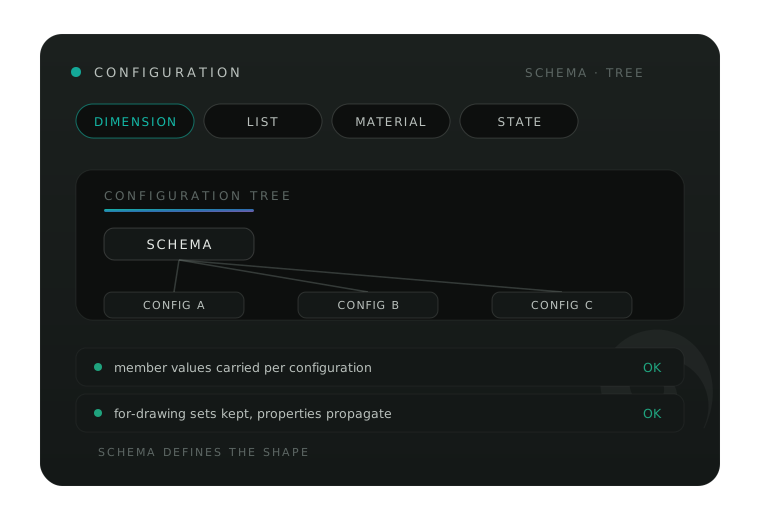
A schema builder rather than a form to fill: dimensions, lists, materials, hands and states are template pieces you drag into the shape your product actually takes. From there Keystone carries member values per configuration, renames in batches, keeps For-Drawing sets, and propagates properties instead of asking someone to retype them.

Illustrative interface vignette for the Configuration Manager: DIMENSION, LIST, MATERIAL and STATE schema chips feed a tree of configurations, with status rows for member values carried per configuration and for-drawing sets kept, both marked OK.
Configuration Manager — illustrative vignette
Shipped

Keystone Expressions

Intent, written down.

A small rule language with eleven runtime functions. Expressions take declared inputs and drive dimensions, custom properties and feature suppression, so the intent of a model is recorded rather than remembered. Equations already living in a SolidWorks file import rather than retype — adoption does not start from a blank page.

Inputs are declared, so every rule states what it depends on. When something changes later, the file itself answers what that change reaches.

Shipped

SolidWorks Equations bridge

The rebuild that holds.

Keystone writes equation sets in solve order and respects the ownership rules of the SolidWorks dialog. Where it finds a misordered set it diagnoses and repairs the order — usually the difference between a rebuild that holds and an afternoon spent learning why it did not.

Shipped

Raw material and gauge lanes

Model to drawing, nothing lost in translation.

Raw-material designators, with gauge tables bound to the materials they belong to. The lanes are sheet-metal-aware, so gauge and material stay consistent from the model through to the number on the drawing.

Shipped, with one part still in build

DriveWorks bridge

Sealed against drift.

Keystone writes a hash-sealed data pack onto the model, which an executor and DriveWorks both read. The seal means a pack that has drifted is detected rather than trusted.

The Excel emission side of the bridge is in its final build phase. It is not finished, and this page will say so until it is.

Illustrative interface vignette for the DriveWorks bridge: a hash seal on a data pack, with status rows confirming the pack matches its build signature and that the executor and DriveWorks read the same seal, both marked OK.
DriveWorks bridge — illustrative vignette
Shipped

Training overlay

The standard teaches itself.

Guided in-pane walkthroughs that follow your organization's own workflow rather than a generic tour. New engineers learn the standard actually in force, at the moment they need it.

Shipped

How it installs

Parity, enforced by the build.

An MSI installer for the add-in, and a web twin that mirrors it feature-for-feature. Nobody has to be at a CAD seat to allocate a number or check a configuration.

Feature-for-feature is tested, not asserted: parity between the two surfaces is one of the automated release gates, so a capability that exists in one and not the other stops the build.

Forge

Forge is the ember-marked module inside Keystone, where inputs are shaped into finished output. It is not a standalone product yet.

Receipts

Why every claim here carries a number

155+ shipped builds
1,600 assertions per surface
15+ gates that can stop a release

Among the gates: parity between the two surfaces, escaping audits, layout probes, and a nested-type lint that exists because a real field failure taught the project it was missing. Every defect in the ledger records the user's own words as the reason for the fix, which keeps the backlog honest about who it serves.

An engineer evaluating a numbering tool has every reason to be skeptical of a page like this one. The only useful answer is a number and a version.

The feature that says no

When Keystone cannot do something safely, it says so in a sentence and stops. It does not guess at a number. It does not write a change it cannot explain. That behavior costs a few features — and it is the reason the tool is trusted with the numbering.

A tool that admits uncertainty is the only kind you can believe when it is certain.

Keystone began as a tool Foresight built for its own consulting work, which is why it reads like something made by someone who had to use it. The rest of that work — the automation, the DriveWorks practice — sits alongside it under the same mark.

Get a plain answer

Describe the problem in your own words — a build that needs scoping, a DriveWorks project that has stalled, or a question about whether Keystone fits the way your team already works.

You will get a straight answer, including when the straight answer is that Foresight is not the right fit. That policy has cost us work. It has never cost us a client.

Prefer email? [email protected]